Showing posts with label Facebook. Show all posts

Thursday, 20 March 2014

A Glut Of Facebook Updates Results In Fewer People Seeing Posts From Pages


Fewer people are seeing Facebook posts from brands, businesses and celebrities, the social network has acknowledged.
Facebook has long used a set of computerized rules—referred to in shorthand as an “algorithm"—to determine which updates show up when you log in. It recently made tweaks to its algorithm that push updates from Facebook Pages—the presences maintained by organizations and businesses—lower in the news feed and show fewer posts to users.
One way Facebook makes money is through a form of advertising where it charges Page owners to boost the reach of their posts beyond the “organic” reach arrived at by Facebook’s algorithm.

The company says the news feed updates put a focus on “higher-quality content.” The end result: While celebrities and brands with large followings may continue to enjoy large audience on Facebook, small businesses who rely on their Facebook pages for marketing will likely be forced to pay up or see their reach on Facebook limited.
Each day, there are an average of 1,500 stories the company can show in someone’s news feed, and Facebook said in December that as a result of the increased competition for post views, many pages will likely see a decline in organic reach.
“We have not given a specific reach number that pages should expect to see because organic reach will vary by page and by post,” a Facebook spokesperson said in a statement to ReadWrite today.
It is unclear how page views have been affected, but a report from Valleywag today claims the company is slashing organic reach to just one to two percent of people who have clicked a Page’s Like button.
ReadWrite contributor Lauren Orsini has experienced a significant drop in the number of followers that see her posts. Today, she shared news of her book launch to over 600 followers that Like her page, but it only appeared in the news feeds of 34 people, or just 5.6 percent of her fans.
Facebook says the best way to ensure a broad audience is viewing your posts is to buy advertisements. Pages can buy ads by reach, and advertisers can target specific demographics to view posts.
“Like many mediums, if businesses want to make sure that people see their content, the best strategy is, and always has been, paid advertising,” the spokesperson said.
However, there is some controversy over the accuracy of advertising metrics and the returns advertisers see from such campaigns.
The downside for Facebook as it makes these changes is that some prospective advertisers may pull away from Facebook altogether.
A decrease in organic reach is an ongoing worry for Page owners as many people use Facebook as a means of free advertising instead of paying for more traditional marketing campaigns. As Facebook continues to put an emphasis on more “high quality” content and lowers organic reach, it could force businesses, small mom-and-pop shops and big brands alike, to rethink their marketing strategies.
Photo by Andreas Ivarsson

Tuesday, 18 March 2014

How to Use Facebook Website Custom Audiences

Are Facebook ads a core part of your social media tactics?

Are you ready to build a raving fan base that reads your articles and buys your products?

The truth is that with the right tools, no advertising can match the impact of Facebook.

If you’re on the fence because you’re not sure how effective Facebook ads are, let me introduce you to Website Custom Audiences (WCA).

In this post you’ll discover what website custom audiences are, how to create them and how to use them.

What Is Website Custom Audiences?


In its most basic form, Website Custom Audiences is a powerful tool that lets you create Facebook ads that target users who have visited your website. Now you can reach well beyond your core fans and email subscribers.

facebook ad created using website custom audiences

Catch the attention of recent website visitors with a relevant ad about your product or service.

WCA may sound quite a bit like Facebook Exchange (FBX), another way to retarget users on Facebook who visited your website. But FBX is created only through an approved third-party and can only create a domain ad that drives people to your website.

The special thing about a WCA is that it’s created and used within ads run through Power Editor or the self-serve ad tool. That means you can create any ad you typically could on Facebook. Your ad can be related to your Facebook page, a page post, offer, event or application.

The image above is an example of WCA in action. I created this ad to sell my one-on-one service and retarget anyone who has visited my website during the past 1-3 days.

I also run a similar ad targeted at non-fans who visited my website to increase my number of relevant Facebook fans.

page like example

Target recent website visitors to increase your relevant fan base.

The response to these and other ads using WCA has been incredible because I’m able to create something extremely relevant for those people who see the ads.

What Are the Benefits of Using Website Custom Audiences?


I’ve never been so excited about a new Facebook advertising feature—the impact WCA has on reach is remarkable. Partner it with your simple sales funnel and watch things get really interesting.
As I’m sure you know, relevance is the key to crazy ROI on Facebook. The more relevant the connection, the more likely the user is to buy.

That’s why I recommend a simple Facebook sales funnel that focuses on building a highly relevant audience, providing regular valuable content to build trust, collecting email addresses and selling.
Let me use my page as an example of the impact WCA makes when paired with a simple Facebook sales funnel.

I have a little over 40,000 Facebook fans. I also have an email list of about 17,000 people. Accounting for overlap, we can assume that makes about 50,000 unique people I can target with Facebook ads who are familiar with me.

Until the launch of WCA, I’d burn through my fans and email list pretty quickly when promoting a post or looking for a conversion. So I’d then move on to Lookalike Audiences and interests targeting.

creating facebook lookalike audience

Creating a Lookalike Audience.

Now, with the addition of WCA, I can generate ads that target recent visitors to my site and entice them to like my Facebook page or sign up for my webinar while memories of my content are fresh.
What group of people would be most likely to want to click on a link to my recent blog post? Someone who has previously visited my website, of course!

As I mentioned above, my highly relevant audience (fans and email subscribers) was previously about 50,000 people. I’ve since created a WCA with a duration of 30 days that consists of more than 115,000 users.

While we can assume some overlap with fans and email subscribers, it’s safe to say that I’m reaching at least 65,000 more highly relevant people who are intimately familiar with my content.
But the power of WCAs goes further: You can also target by specific pages or sections of your website people visited.

So, for example, I could create an ad for my Power Editor training course targeted at those who read a tutorial about Power Editor on my website. Or target those who visited the landing page for that course.

You can use WCA to exclude people as well. I could promote a post and exclude people who’ve already read it. Or I could promote my webinar or training course, but exclude anyone who’s already signed up.

That’s increasing efficiency and limiting waste!

How Do You Create Website Custom Audiences?


Whether you create a WCA from Power Editor or the Ads Manager, the process is the same with the exception of the first step. So let’s start there.

From the Ads Manager, click on Audiences in the left column, then click the green Create Audience button.

ads manager

Create a WCA from the Ads Manager.

If you’re using Power Editor, click Audiences on the left side (old design) or click the Ad Tools drop-down at the top right and select Audiences (new design).

power editor menu

View audiences within Power Editor.

Next, click the Create Audience drop-down at the top left and select Custom Audience.

create custom audience

Create a custom audience within Power Editor.

From this point forward, everything is the same whether you create the WCA in Ads Manager or Power Editor.

First, you’ll be asked to agree to Facebook’s Terms for Custom Audience from your Mobile App and Website. You should accept that.

terms

Accept Facebook’s terms for using custom audiences from your website.

If you haven’t previously created a custom audience, you may also get an error message indicating it isn’t yet active.

After accepting the terms, you’ll see the following screen. This is where the magic happens.

dialog box

Create a WCA.

The top section is easy. Name your WCA something that will make sense later. For example, Website Custom Audience—All Pages—30 Day Duration.

You don’t have to fill in the description unless you need more space to describe this particular WCA. The name is most important because that’s what you’ll see when you’re targeting in an ad.
The Visited area is where you create your rules for determining which website visitors will be part of your WCA.

dialog box

Create rules for your WCA.

You’ll be able to select Domain, URL or Path. You can use Domain by itself, or include it with one or both of the other options.
  • Domain lets you target anyone who visited a particular domain within your control.
  • URL lets you target anyone who visited a URL that contains a particular character or string of characters.
  • Path lets you target anyone who visited a page that contains a particular character or string of characters within the path (after the domain).
You can include multiple character strings in each section if you want to create a basic OR statement. In the Path box, I used this option to target anyone who both visited jonloomer.com AND visited a page that included either website OR custom OR turkeys in the URL.

Click the + button to create an additional AND statement rule. For example, you could create a new rule for Visited URL and assign particular page URLs from your site like this:
Visited URL: website-custom-audience facebook-ads

That statement, along with your established Domain, targets anyone who both visited jonloomer.com AND visited a page that included either website-custom-audience OR facebook-ads in the URL.

You can also change the Contains Any option to Doesn’t Contain if you want to exclude particular page visits.

By default, the WCA’s duration is 30 days (but you can change that to be as short as 1 day or as long as 180 days).

The duration includes anyone in your audience who visited qualifying pages during the most recent 30 days (or the duration you set). This is dynamic and the clock starts ticking as soon as you click Create.

date range

This WCA will generate a list of users who visited qualifying pages of your website during the past 30 days.

Finally, you’ll want to click the View Remarketing Pixel link at the top of the page.

pixel

You’ll need to paste your remarketing pixel between the <HEAD> tags of your website.

This brings up the code you need to copy and paste between the <HEAD> tags of your website’s template in order to put the pixel on every page of your website.

How Do You Use Website Custom Audiences?


When you create a Facebook ad, you’ll type the name of your WCA in the Custom Audience box.

When you have more than one WCA, you may want to include one in your ad, but exclude another. If you’re using the self-serve ad tool, you can only include, not exclude, a WCA.

self serve targeting

Enter the name of your WCA to target those users in the self-serve ad tool.

However, if you’re using Power Editor, you have the ability to both target and exclude WCAs.

power editing targeting

Target or exclude WCAs within Power Editor.

Need some ideas on how you could use WCAs? I have a few.

You can use “page likes” to target anyone who visited your website during the past 30 days who doesn’t already like your page (i.e., exclude current fans).

You can use “promote blog post” to target anyone who visited your website during the past 30 days, but exclude anyone who already read that post.

Finally, you can use “sell product” to target anyone who visited the landing page for your product, but exclude anyone who visited the thank-you page and therefore has already purchased that product.

Frequently Asked Questions About Website Custom Audiences


I get a lot of questions about Facebook ads and WCAs, so I thought I’d answer the most commons ones here.

How many WCAs can I create? Right now, you can create up to 200 WCAs, though that limit will eventually be lifted.

If I’m using more than one WCA, do I need a pixel for each one? No. You only need to paste the pixel to your website once.

What’s the longest duration I can set for my WCA? 180 days. Once a user has been part of your WCA for longer than your set duration, they dynamically drop off of the list.

Can I use my pixel on multiple accounts? No. You can only paste one pixel per account, so you can’t generate multiple pixels for other websites. You could technically use the same pixel, but filter based on domain.

Can I create a WCA to watch what my competitors are doing? No. You can’t create a WCA based on visitors to a competitor’s website because you need access to the back end to paste the retargeting pixel.

Are WCA updates in real time or is there a lag? They’re in real time, so you’ll see the number of people added to your audience rise as users visit your website.

Some Final Thoughts

Facebook ads offer some of the most powerful targeting available to marketers. With WCAs, you can explode your reach and drive more traffic to your website, increase sales and increase your number of fans, of course.

What do you think? Have you experimented with WCAs? What results are you seeing? Let me know in the comments below!

Tuesday, 4 March 2014

Guide to Facebook Reach: What Marketers Need to Know

Have you seen a drop in your Facebook performance?

Do you want more fans to see your Facebook updates?

If so, you need to understand Facebook reach.

In this article, you’ll find out what Facebook reach is, why some pages have more visibility than others and how to improve your own Facebook page reach.

What Is Facebook Reach?

Facebook is always rolling out new features in an effort to give users a more seamless and useful experience. Unfortunately, that doesn’t always work in your favor when it comes to reaching as many people as possible with your page content.

Facebook reach is the number of unique people who saw your content. It affects every other metric you can track: engagement, likes, comments, clicks and negative feedback. And that’s not all. There are different kinds of reach: post, page, organic, viral and paid. Everything on Facebook boils down to reach.

combined reach reach

Total Reach on Facebook.


Post reach and page reach, for example, are different and have different weight. Post reach is the number of people who saw a specific post in their news feed. Page reach is the number of people who saw any of your post content during a given period of time (daily, weekly or monthly).

These two reach metrics can be deceiving or confusing. If you don’t post very often, you may have a very high post reach, but a low page reach. If you post often (e.g., five times a day or more) you may have a low post reach, but a pretty high page reach.

Which one should you focus on? Ask yourself whether you want to have individual posts seen by the most fans or make sure your brand gets in front of your fans on a regular basis. Your answer determines which form of reach—post or page—is more important to you.

Post and page reach both have three main subcategories: organic, viral and paid reach.

Organic reach is the reach Facebook gives you for free. It happens in the news feed when your fans see your updates. There are other possibilities, such as random users visiting your page, but these are insignificant compared to news feed views by fans.

Viral reach consists of the people who see your content because someone else created a story about it. For example, if a fan likes, comments or shares your post, their friends will see your post even if they aren’t fans of your page. The same is true if you’ve paid to reach larger audiences who may or may not already be your fans. If one of those targeted people creates a story, their friends will see it as well. Both are viral reach.

A quick note about viral reach: When you export your Insights data to an Excel spreadsheet, viral reach data is still included when you select the old Insights format. However, viral reach is a subsection of organic reach in the new version of Insights, which was rolled out in 2013. Expect to see viral reach metrics totally disappear from your Insights and the Facebook API soon. Facebook has decided to go for simplicity rather than detail.

Paid reach is a subset of post reach and is pretty easy to track and report. You paid for it, so you know where it came from. If you pay to promote your posts, your post reach is going to be much bigger than your standard organic reach (because you’ve paid to reach more of your fans).

organic and paid reach

You can find paid reach metrics under the Post Reach area in Facebook Insights.

What’s the Best Way to Measure Facebook Reach?

Until recently, it’s been common to benchmark your overall Facebook reach against your total fans (even I was doing this). Many social media marketers checked the number of people reached for a given post, and then compared it to their total number fans and calculated a percentage of how many fans they reached. That’s no longer the best way to look at it.

Facebook’s new Insights gives you access to the number of fans who are online at any given point in time. A Facebook page post lifespan rarely exceeds 2 to 3 hours.

Given that, we should benchmark against the total number of fans who were on Facebook at that time.

For example, in the graph below I can see that most of my fans are logged into Facebook around 3:00pm. If I post at that time, about 3,500 of my 9,500 fans should be logged in.

fans online

Use the When Your Fans Are Online option to find out when most of your fans are logged into Facebook, then post at that time and use that reach as your benchmark.

If the post reaches 600 people, I shouldn’t look at it as 6.3% of my page’s fans (600 people out of 9,500), but rather 17% of the fans (600 out of 3,500) who were online and reachable when I posted it.  
This is important when you’re explaining page performance to a boss or client. These are the results your hard work is producing!

How Hard Is It to Get Good Reach?

In December 2013, people started reporting a big drop in organic reach for the pages they were managing. The drop in organic reach varied—some saw a large drop, some saw a small drop and others saw no change.

A post from AdAge revealed a “leaked” deck from Facebook stating that pages should expect their reach to continue decreasing and be ready to pay for visibility in the news feed. The social media ecosystem and blogosphere were outraged.

Not a single day in December passed without a new blog post on the subject. Some were condemning Facebook for contriving sneaky new ways to steal their money. Others were defending Facebook’s efforts to improve the quality of content distributed in the news feed.

On December 20, I looked at the average data of more than 6,000 pages of various sizes and industries. The data shows a constant decline over the previous six months, but no noticeable drop in December (when people started reporting the issue). However, I did discover an interesting trend.
Pages with high post engagement were the least affected (if at all). Pages with a high engagement rate along with a high negative feedback score (i.e., users hide your posts or report them as spam) were more affected. Finally, pages with a very low engagement rate were affected most.

The average monthly organic reach declined from 73% to 55% of fan base (orange graph). Notice there’s no significant drop in December for the average. However, that average decline has not affected every page.

The black graph represents the evolution of a nonprofit page I manage and its monthly organic reach has increased during the same period. That page has very high post engagement and very low negative feedback.

page reach

Working to increase post engagement may help you reach more fans in the news feed.

The type of content a page published also had an impact. Photo posts had the most negative effect, so if you post a lot of photos and have a low engagement rate, you’re probably suffering more than the average page.

Do Other Social Networks Offer Better Reach?

When the Facebook reach issue was ignited in December, many social marketers branded Facebook as a fraud and advised that it was time to move on to other social networks, Google+ being the lead contender. That emotional reaction was inherently wrong on all levels.

The most important flaw in that plan is that other social networks don’t provide any kind of reach metric. Only Facebook provides that data. When the other networks do provide analytics, they’re nothing close to the breadth of information Facebook gives page owners.

Most social marketers were upset about the pay-to-play aspect of Facebook’s new reach algorithm. They blamed it on Facebook being a publicly traded company and accused it of only being out for money.

Consider this: Do you think Google is acting as a nonprofit with no interest in monetizing you and your data? Google’s changes to its search algorithm (e.g., Panda, Penguin and Hummingbird) have been far more damaging to online businesses than Facebook’s reach tweaks. When a business’s free SEO ranking goes dark, in many cases they pay for AdWords to stay in front of their audience.
Facebook has one of the best targeting options for businesses. For some of us, leaving Facebook to rely solely upon Google AdWord’s targeting capabilities would be business suicide.

istock social media

Don’t automatically discount Facebook from your social media mix. Image source: iStockPhoto.com.

Overall, Facebook, Google+, Instagram and Twitter are different and complementary, not opposing alternatives to each other. Look at Facebook as a component of your strategy, not the whole thing.

If most of your audience is on Pinterest or Google+, focus more energy there, but why leave the place where the people you need to reach are spending all of their time?

Does Paying for Facebook Reach Give a Good Return on Investment?

For some, paying Facebook for exposure will become a necessity. Is this such a bad thing? Should you be concerned about the need to pay to increase your content visibility? Not necessarily.
Of course, some content doesn’t deserve to be paid for and some does. Paying to promote the right content in order to reach more people in your target audience (fans or not), can lead to a lot of conversions.

First, make a distinction between casual content and business-worthy content. Photos from your latest speaking gig, videos of fun things you do at the office and quick news updates about your niche are all relevant and good, but should you pay to get more exposure for them? Nah. Those posts don’t impact your bottom line.

casual post

When you post about fun stuff you do at the office, it’s not about reaching a big number of your fans.

But if you’re announcing a new product, new features, an ebook or webinar or other content you’ve spent hours on, isn’t it worth it to pay $30 or $50 to make sure your hard work is seen by 9,000 people instead of 1,000? Yes! Your time and specialized content are worth it. Why waste those efforts to save $30 or $50? That’s nonsense.

If you’re sharing the type of content you can track for short-term ROI (e.g., leads or revenue), isn’t it worth it to pay $100 or $150 to generate 300 or 400 hot qualified leads or 10 new subscribers with a lifetime value of $400? You bet! Actually, for this kind of content, I haven’t found a more affordable way to generate ROI with PPC, and I’ve tried a LOT of options.

business post

When posting about a new product or feature that can generate new customers, it’s worth it to pay for more reach.

In the example below, the cost to acquire a new customer via sponsored posts was between $20 and $30, which is around 10% of our average revenue per customer. Pretty good return on investment as far as I’m concerned.

ads reporting

Paying for extended reach can result in higher ROI.

What Are the Best Tactics to Sustain Facebook Reach?

If you want to make the most of Facebook reach this year, I have a few ideas on how to do that. Posting relevant curated content or reposting your own evergreen content are great ways to encourage engagement (which translates to reach), especially when you post when your fans are on Facebook.
Posting more often and at different times of day are your best tactics to increase your overall reach and brand awareness. Pages that post at least three times a day get very high page reach metrics and much more brand awareness than pages that only post once a day or fewer.

In the example below, the page on the left has a pretty high post reach (24% of fans are reached for each post!). The page on the right has a much lower post reach. However, the page on the right posts several times a day while the one on the left only posts once a day. The overall page reach is much higher for the one on the right (93% of fans reached on a monthly basis versus 53%). Neither of these pages are using paid reach; it’s all organic.

reach comparison

Posting frequency affects your post and page reach.

Creating consistently great content is hard. If you’re relying on great content produced in-house to nurture your Facebook page, you need to change your approach.

Curation is the cheapest and most effective way to produce more high-quality, shareable content. There are plenty of experts in your industry, and they all invest a ton of time crafting great content. Have the right curation tools in place to help you spot content quickly and share the best of it on your page. Remember, the goal here is brand awareness. You’ll get that by sharing high-quality content for your audience to see.

Other types of content you can share are events like attending or speaking at a conference or even appearing on a TV or radio show. This kind of post takes less than five minutes to do—you just need to add them into your daily routine.

life post

Sharing your special events gets your brand in front of fans and keeps them in the loop.

Sharing content doesn’t have to be a “go big or go home” scenario. Sharing quick nuggets of content along with your in-depth blog articles mixes things up and keeps it interesting.

Post a fun fact or an expert opinion or question about the latest news in your industry. When you find an interesting article that’s relevant to your niche, just hit Share and add a small introduction. This kind of content is super-easy to create and sustains brand awareness.

report post

Share interesting content relevant to your fans for more engagement and reach.

Don’t forget your evergreen content! Once a week, plan to reshare your best and most costly pieces of content to get them in front of new fans.

Jon Loomer does this a lot and it’s one of his tricks that allows him to post 2 or 3 times daily. Here’s a post on Jon Loomer’s Facebook page published on February 9 about a blog post originally published on November 18. It’s still getting likes, shares and clicks!

evergreen post

Don’t waste your evergreen content; it deserves to be shared again and again.

While it can be frustrating when Facebook changes the rules of the game, you can still use the network to your advantage. Understanding how reach affects all reported data, choosing content wisely and paying to promote posts that can result in conversions can put you ahead in the end.
Compare your reach performance against the average and use the tips here to help you get better results.

What do you think? Have you noticed a dip in your Facebook reach? Do you have any tips to keep your posts front and center in the news feed? Let us know in the comments.

Thursday, 23 January 2014

Dramatically Improve your Facebook Page

There is an art and a science to maintaining an engaging and interesting Facebook page. I’m going to share some tips to dramatically improve your Facebook page with easy to implement strategies. Using the tools that Facebook provides, your own brain power, and a smart mix of content, you can have a fantastic Facebook page in no time.
699 million people log into Facebook daily so it’s obviously a network that deserves your attention and tweaking the way that you post on Facebook can make a huge difference. You don’t need to spend more money, you need to create interesting content in the way that will interest your Facebook audience and appease Facebook’s Edgerank. It’s totally doable.
From Rebekah Radice, the keys to create a memorable Facebook brand are:
  • Share your story in a real and authentic way, allowing prospective clients an intimate look in to who you are and why they would want to work with you.
  • Create content that caters to your fans particular by crafting content that speaks to their wants, needs and desires.
  • Discuss what matters most to anyone in need of your product or service. Avoid ever using Facebook to discuss immaterial, vapid or otherwise irrelevant topics

The Art of Facebook

The art of Facebook is mixing your media. Facebook allows four different types of posts:
  1. Text only
  2. Photo posts (with or without text)
  3. Video
  4. Embedded link
Posts with text only get the most engagement while posts with questions get 100% more comments. Text posts perform better with less than 80 characters but I vary the amount of text that I post. The key is to post a variety of different post styles to keep your page fresh and interesting. This also appeals to Facebook’s Edgerank which I’ll discuss in a bit.
There are three types of ways that people can interact with your post on Facebook:
  1. Likes
  2. Shares
  3. Comments
Likes are the lowest hanging fruit, shares would be second in terms of appeal, and starting a conversation in the comments is goal on Facebook. So, while it’s great to get a lot of likes, more comments will lead to your content getting more views on Facebook.

Use great images in the proper size and format.

I realize this seems like common sense but have you looked at Facebook recently? A lot of Facebook pages are getting this wrong. To get a perfect photo, you have the follow Facebook’s size guidelines.
1. Facebook images should be in the 1:1 aspect ratio for a timeline photo preview that isn’t distorted. I load square images at 1000 x 1000 pixels and these scale perfectly on the page.
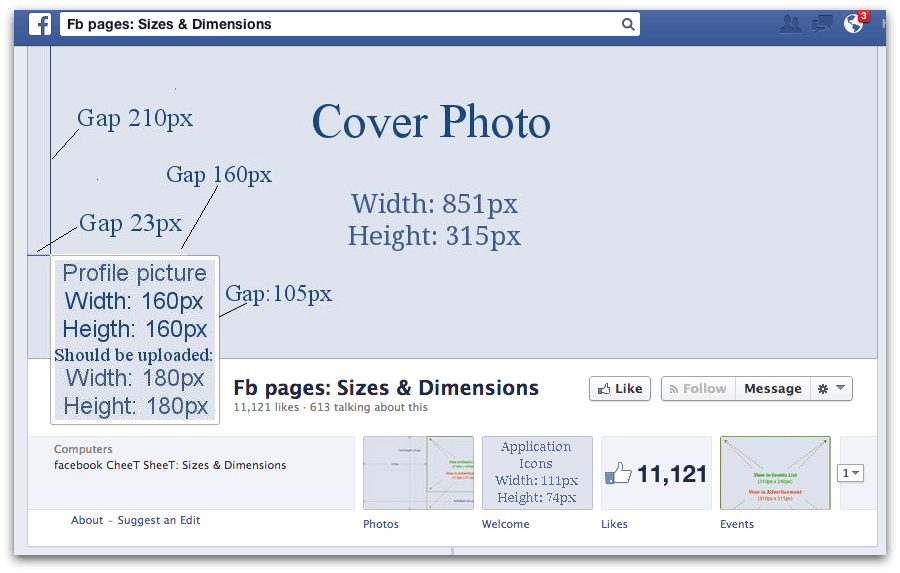
2. Cover photos are 851 pixels by 315 pixels. When you post a new cover photo add text including a link to your website in the photo description to maximize the spin through the Facebook newsfeed.
Facebook cover photo screenshot
If you have weak design skills or don’t have time, please use a professional designer to create your images. If you only take one piece of advice from my article, use great images in the proper format.
Resource: How to Set Up Your Facebook Page Like a Pro

People want to be entertained. Use the art of visual storytelling to grow your Facebook page.

The Science of Facebook

What is Edgerank? Edgerank is the science behind Facebook success. “An Edge is basically everything that “happens” in Facebook. Examples of Edges would be status updates, comments, likes, and shares.”
Look at Edgerank as Facebook’s formula for popularity. If your post does well, more people will see your future posts. The more popular you are, the more popular you can become. How can you sit at the cool kid’s table? Just like high school, you need to conform a bit. Sorry, it’s just a fact of life on Facebook.

The formula is: affinity, weight, and time decay.

1. Affinity = the relationship you have on Facebook. “Affinity is built by repeat interactions with a Brand’s Edges. Actions such as Commenting, Liking, Sharing, Clicking, and even Messaging can influence a User’s Affinity.”
To do well in the Affinity section, post great content that keeps people coming back for more. Use witty text and great photos with questions to pull people in and invite them to comment on your page.
If you’re looking for great content to share on your Facebook page, sign up for the HASO email list that Guy Kawasaki and I started. It’s our raw curated content sent out in a daily email digest.
2. Weight = “Weight is a value system created by Facebook to increase/decrease the value of certain actions within Facebook. Commenting is more involved and therefore deemed more valuable than a Like.”
Create a conversation on your Facebook page with interesting quotes, asking questions, and posting content that gives people the opportunity to state their view or opinion. This is where asking questions to engage people comes into play.
If you’re stuck on how to post differently, check out Post Planner to get some ideas for ways to vary your text.
3. Time Decay = How long has your post been live on Facebook ? “Time Decay refers to how long the Edge has been alive; the older it is the less valuable it is.”
The timing of your posts is important. Check your best posts to see when you posted them and use the analytics in Facebook insights or Buffer.
Here is the caveat, if you mess up your Facebook Edgerank, it takes time to build it back up. You could give up your seat popular kids table and people will not see your posts in their timeline if you tank your Edgerank. The good news is that you can build your Edgerank back up so make sure that you experiment wisely and monitor your Facebook insights.
A great way to see how your Facebook page is doing using the LikeAlyzer tool. It’s a fantastic free tool. “LikeAlyzer helps you to measure and analyze the potential and effectiveness of your Facebook Pages. It allows you to monitor, compare and explore all the possibilities of your Facebook Page by evaluating your activity to ensure your success.”

Experiment with your Facebook content.

  • Mix up your posting times to test your audience
  • Stay relevant to the topic of your page so you don’t confuse people
  • Add variety to your posts
  • Be interesting or forget about posting at all
  • Post consistently and space your posts apart so you don’t clog your fans newsfeed
  • Use Facebook Insights to see what content works well and do more of that

Dramatically improve your Facebook page
Use calls to action (CTAs) on your posts to encourage conversation or action. It’s important to keep calls to action in the voice and style of the page. You can simply ask people to LIKE the Facebook page and SHARE a post if they like it. This works on many Facebook pages but I don’t use it very often since it doesn’t seem a natural fit with the content I share. Examples of CTAs:
  • Ask questions as a text only post
  • Post a quote and ask a question
  • Post a promotion and ask your followers to take action by clicking the link
  • Pin it for later with a link to a Pinterest pin
Resource: 7 Types of Facebook Questions to Ask to Build Engagement on Facebook


Mix art and science to create your perfect formula and boost your Facebook page activity.
Use these guidelines to help you build a fantastic Facebook presence. The most important thing is to gauge what your Facebook fans like and give them more of that while providing some surprises and variety. I’m sure that you can apply the art and science of Facebook and dramatically improve your Facebook page too. Please consider this a guideline and experiment to see what works best for you on your Facebook brand page. I look forward to hearing about your results! What works for you on your Facebook page? Do you have any favorite Facebook pages that you like to follow? I’d love to hear what you like about them and how they engage you with their content.
If you liked this article, please share with your favorite social networks and pin it to your Pinterest boards to save for future reference. I really appreciate your support
I hope you’ll consider signing up for my subscriptions to receive new content. You can add your email address below to receive updates on my future articles.
Photo credit: Big Stock Photos

Tuesday, 21 January 2014

11 Ways to Increase Engagement on Your New Facebook Page

Communication has never been a one-way street, but past marketing methods have not been conducive to back and forth discussions. Social media marketing, on the other hand, thrives on interaction and engagement between a company and its customers.

The appropriate interaction makes people feel valued. It means their needs and desires have been acknowledged and that the company is actively working to fulfill them. Getting the conversational ball rolling, however, can be a challenge.

How can a business get fans and visitors to engage with a social media marketing effort? Start with these first 11 tips for increasing engagement on a new Facebook page:
  1. Welcome visitors.
  2. Ask a question about products or services.
  3. Ask fans about their business.
  4. Ask for help or crowd-source new product ideas.
  5. Ask an easy non-product related question.
  6. Answer a question from a customer.
  7. Respond quickly to comments from visitors and fans.
  8. Create a connection from Facebook to the outside world.
  9. Say “Thank You” publicly to active fans.
  10. Join Facebook groups/networks.
  11. “Like” other businesses on Facebook.
Fans return to where they feel welcome and where they are rewarded for being there. Engagement is increased by making it easy to engage in return. While there are people who feel comfortable writing a long response or carrying on a discussion, most prefer to keep things simple. So the business should as well. To see how well the social media marketing effort is working, determining the ratio of visitors that clicked “Like” or “Recommend” out of total visitors shows how effective the Facebook page has been.

Ease and convenience rule modern life, especially in social media marketing. To get answers, questions should be easy to respond to. If all it takes is a word or two, most people will take the time to participate. Rather than make the questions all about the product, though, the best social media marketing response will come from questions about a fan’s own business, about industry practices, and about improving a product or service to better fit a fan’s needs.

For all social media marketing, when a fan or visitor asks a question, the response should be as quick as possible, most effectively the same day. Using the email notification feature can ensure this. This means businesses will need staff dedicated to social media marketing efforts. Publicly telling fans “Thank you” means just as much as a quick answer. Showing appreciation goes a long way to cementing a relationship.

A spirit of generosity is also a very attractive part of social media marketing. When a business can
“like” another business, not only does that increase awareness of that other business, but reciprocity levels the same advantage back. This type of mutual admiration society also shows that the company is confident and comfortable with sharing attention.

As engagement grows, advocates will be found for the company through social media marketing as well as increased engagement between fans, helping to grow awareness across their networks. Joining networks and groups is another way of doing this. Plus, this level of engagement yields a trove of information about fans and visitors that can be mined to determine prominent industries using a particular product or service, what features are popular and which could be jettisoned, where improvements can be made and what new product or service could be successfully offered. This is one of the biggest strengths of social media marketing!

Tuesday, 14 January 2014

TRENDS DISRUPTING AGENCIES IN 2014

The role agencies play for brands is changing. The disruption that is coming will require agencies to completely rethink how they approach servicing clients, how they structure their teams, and the services they offer clients. Further, it will require brands to take a hard look at their agencies to determine if they are able to meet their growing demands.
Agencies have long been though of as the thought leaders who are able to drive marketing innovation, however the rise of new marketing approaches include social media, mobile, and content marketing are forcing agencies to take a hard look at how they can fulfill the demands of their clients while keeping pace with technology that is literally changing and evolving right in front of us.
The following trends are set to turn the agency model on its head:

TrendFully-Integrated Media Strategy

Brands are starting to realize that a siloed approach to marketing channels isn’t going to deliver maximum results. The agency that used to come in and pitch a great idea for a public relations only campaign will be met with intense levels of scrutiny. Instead, agencies will need to consider how an integrated approach to all of the available marketing channels will help clients reach their goals. This will require brands to more fully integrate with their clients’ marketing teams so they understand the big picture.

Campaign-based Marketing Will Evolve into Story Telling

The idea of a marketing plan of running campaign after campaign is becoming passé. Instead, brands want long-term strategies that focus on story-telling not a catchy one month campaign. Agencies will need to consider a theme-based approach to story telling that helps to humanize brands and keeps them in the minds of their target audiences. This will lead to layered story based campaigns that are designed to tell a larger story, one consumable bite at a time.

Generalists Will Be More Important than Ever

Agency teams have been focused around combining a team of specialists aligned to a client’s needs. Hiring has been done based on what “specialty” someone brings to the table. However, with the need for an integrated approach that combines story telling brands will need to hire more generalists who understand how all of the marketing channels fit together to serve the greater goal. Generalists should be responsible for adding perspective and depth beyond a specific marketing tactic and pulling specialists together to show them how their efforts combine to create a snowballing impact for the client.

New Service Offerings will Emerge

Agencies will be asked to take a larger role in content marketing including producing content for clients. They will also be asked to fully understand how mobile impacts their clients. The client’s website and the content they produce are critical elements for agency and client success. You may see agencies adding content teams, user experience designers, responsive-design developers and mobile developers.
Ultimately, these changes will help push agencies forward. There’s only one question. Is your agency ready?

Thursday, 2 January 2014

25 Creative Ways to Use Facebook Cover Photos

Are you using your Facebook cover photo to maximum effect?
Do you change your cover image once a month, or once a year?
The Facebook cover photo is prime real estate for any business, and creating high-quality images. Use this to include calls to action (CTAs) and other helpful information for  your fans.
Here are 25 awesome examples of cover photo ideas you can use to make your brand stand out (there are also some cover photo best practices at the end of this post).

#1: Get Into the Holiday Spirit or Change With the Seasons

Design cover photos that change with the seasons and the holidays. It’s easy—justexperiment with seasonal colors or add traditional seasonal images like leaves or snowflakes.
The auto company Pep Boys, for example, created a simple and festive cover photo for the winter holiday season. It would be easy to create a similar cover photo using a stock photo and free tools from PicMonkey or Canva.
pep-boys-cover-image
Update your cover photo for the holidays or the seasons.
In the image below, Edible Arrangements says “Happy Valentine’s Day” with their photo.
edible-arrangements-cover-image
Edible Arrangements adjusts their cover photo to celebrate holidays like Valentine’s Day.

#2: Promote Trends

If you’re a retailer, use the cover photo to talk about new trends in your industry andfeature new products.
The shoe company PiperLime does this really well. Here’s one of their cover photos that announces a new trend: dressed-up stripes.
piperlime-cover-image
The cover photo can be used to show recent trends in your industry and new products.

#3: Direct Fans to an App

When you launch a new app, one of the best ways to promote it is to update your cover photo. You can draw attention to your new app by using arrows or other illustrations that point directly to your app thumbnail.
For instance, whenever your business launches a new ebook (like Facebook expertJon Loomer did, below), PDF, infographic or other free resource, updating your cover photo notifies your fans of your new resource and points them to where they can get it. In the case of Loomer’s ebook, the arrow literally points straight to an app.
jon-loomer-cover-image
Use the cover photo to direct fans to a recently built custom Facebook app.

#4: Showcase New Products 

If your company is a product-based business, use the cover photo to feature new or seasonal products. In the design of your cover photo, include text with relevant information about the products, like a date the product(s) will be available for sale or a few words to describe the product.
In the example below, Ampersand Design Studio, a design store, cleverly teases customers with a new fabric collection in one of their cover photos.
ampersand-design-studio-cover-image
The cover photo is a great place to highlight new products.

#5: Get Their Mouths Watering

If you’re a restaurant, a catering company or in the food industry, there is nothing more enticing than a photo of one of your mouth-watering dishes. As the seasons change, lots of eateries change their menus. Use this as an opportunity to update your cover photo to feature what’s new on your menu.
The popular Italian restaurant Olive Garden does this often.
olive-garden-cover-image
Restaurants can use the cover photo to show an entree to excite fans about their meal.

#6: Promote Your Hashtag

Facebook began supporting hashtags a while ago and some brands have had great success using them. One advantage of the new feature is that it allows brands to track fans’ conversations about the business. You can discreetly feature your hashtag in the bottom right of your cover photo design, or make it the feature.
The headphone company Frends updated their cover photo in August to feature a hashtag that was associated with a summer contest they hosted.
frends-cover-image
Hashtags are a powerful marketing tool that brands can promote in their cover photo.

#7: Promote a Facebook Exclusive or a Fan-Only Incentive

Forty-two percent of users like a brand on Facebook in order to get a coupon or discount (according to a 2013 Syncapse report). So give them what they want! Make your promotions exclusive to Facebook fans to incentivize users to like your page.
Promote your fan-only exclusives using your cover photo, like the Utah restaurantRiverhorse on Main. Their cover is very straightforward.
riverhorse-on-main-cover-image
Fan-only content wins on Facebook, so use the cover photo to promote fan-only offers.

#8: Celebrate a Milestone

Businesses love to celebrate like-count milestones and anniversaries on Facebook. For these times, use the cover photo as a place to say thanks to your fans or have some fun with your cover photo design.
The clothing brand C. Wonder, for example, celebrated their birthday in October with a cute confetti cover photo.
c-wonder-cover-image
Let your fans in on the celebration of special milestones.

#9: Produce New Leads

What kinds of leads are you most interested in acquiring? Whatever your goals, you can use your cover photo to encourage people to opt-in or find more information about your brand elsewhere.
If you want to encourage your Facebook fans to check out your website because you’re hosting a sale, use your cover photo to feature your business’s website URL. Or, if you want more newsletter sign-ups, use your cover photo to direct users to your newsletter sign-up app.
Or, if your company just wants to boost page likes, create a cover photo like the design agency Braid Creative & Consulting, which has an arrow pointing to the Like button.
braid-creative-consulting-cover-image
Produce leads and boost page likes using the cover photo.

#10: Inspire Action

The cover photo can be an effective tool for motivating fans to take action! Brick-and-mortar businesses should use the cover photo to advertise store events, specials or new products, which will encourage fans to make a trip to your store.
Online businesses can also use the cover photo to encourage fans to check out new products and take advantage of special offers.
In the example below, the travel company Travelocity has a cover photo that uses inspiring travel photos along with a few different CTAs. Notice the “Get a daily clue on our Let’s Roam app” text at the bottom right of the image and their campaign’s website URL “gnomenabbed.com” incorporated into the cover photo design.
travelocity-cover-image
Use the cover photo to motivate your fans to take an action like booking a trip.

#11: Create a Sense of Urgency 

Try uploading a cover photo image and CTA that are installed for a limited amount of time and then measure the sales that result from it.
For instance, if your business is having a sale that only lasts 24 hours, update your cover photo during those 24 hours to notify your fans of the sale. Make sure the CTA conveys a sense of urgency that motivates fans to respond fast.
The software company HubSpot, for example, uploaded their “Flash Sale” cover photo to advertise a promotion for their inbound marketing conference.
hubspt-cover-image
Creating a sense of urgency makes fan want to act quickly and the cover photo can do this.

#12: Have Some Fun! 

Not every cover photo has to “sell.” On occasion, the photo or image can be just for fun and designed just to encourage engagement.
In the cover photo example below, the email marketing company MailChimp uploaded a photo of their mascot Freddie with his back facing the reader—their fans loved this!
mailchimp-cover-image
Use the cover photo to post a fun picture for your fans.

#13: Establish Authority 

Use your cover photo to showcase an image that represents your brand or features your credentials.
Take a look at Nathalie Lussier‘s cover photo below. With a simple cover photo image, she establishes authority as a digital strategist. And for users who visit her page for the first time, there’s no question about who she is or what she does.
nathalie-lussier-cover-image
Use an image that represents your brand and features your credentials in your cover photo.

#14: Show What You Do

The cover photo is the ideal place to show your fans what your business does. The more literal you are, the better. This prevents any confusion for users who discover your page for the first time.
Katelyn Brooke, a designer and blogger, makes it clear what she does. In the design of her cover photo, she showcases her work in a personal and effective way.
katelyn-brooke-cover-image
Show off the capabilities of your business in your cover photo.

#15: Compare Your Business to Your Competition

If you’re in a competitive industry (and heck, who isn’t?), experiment with a cover photo that shows your company head-to-head with your competition.
The flower company Bouqs does this really well. Make note of how they use the words “Other Guys” rather than listing off the name of a specific competitor. This prevents them from looking combative, while still making their point: They’re less expensive than their competitors.
bouqs-cover-image
Use the cover photo to do a comparison of your business with a competitor.

#16: Promote Your Other Social Platforms 

If you want more followers on your other social channels like Pinterest, Instagram and Twitter, use your Facebook cover photo to cross-promote your other accounts. Be sure to include a strong CTA within the cover photo’s image description and links to your other social profiles.
In this example, ShortStack used their cover photo to attract their Facebook fans to their Twitter account.
shortstack-cover-image
Direct your fans to your other social media platforms through the cover photo.

#17: Feature a Fan or Customer

Every single day for months, the cookie company Oreo uploaded a new cover photo featuring one of their fans who was celebrating a birthday.
Oreo received hundreds of likes and comments on each of their fan-featuring cover photos.
Apply the same idea to your business’s next cover photo design. But instead of featuring a fan or customer every day, feature a new fan once a week or once a month to avoid getting burned out.
Bonus: The birthday girl or guy is likely to share news about the honor with his or her friends, increasing exposure of your brand.
oreo-cover-image
Highlight a special fan or contest winner on the cover photo.

#18: Keep it Simple

Sometimes simple is best.
The design company CooperHouse created a cover photo that has a beautifully simple design and one concise sentence that describes what their company does. Nothing more is needed.
cooperhouse-cover-image
A simple cover photo idea can attract fans and likes to your Facebook page.

#19: Promote Your Contest

During the back-to-school season, the tortilla company La Tortilla Factory updated their cover photo to promote their back-to-school–themed photo contest.
If your business is hosting a Facebook promotion, one of the best ways to notify fans of your contest is by updating your cover photo. Like La Tortilla Factory, it’s nice tofeature what your contest prizes are within the design of your cover photo.
la-tortilla-factory-cover-image
Use the cover photo to promote a contest you’re running on Facebook.

#20: Include a Strong Call to Action

Some of the best CTAs are posed as questions.
Pinterest expert Melanie Duncan‘s cover photo is a great example of how to use a CTA question in a cover photo. The most important text is bolded and the entire CTA is framed in an eye-catching red box.
This kind of cover photo design is super-easy to pull off. Simply upload a photo you like into an online photo editor like PicMonkey, then use the tool’s text and shapes features to add your CTA into the image.
melanie-duncan-cover-image
A strong CTA lets fans know exactly what you expect.

#21: Advertise a Sale

The yoga company Yoga Six participated in Black Friday last year by updating their cover photo. On it, they displayed their Black Friday deals. Instead of changing their cover photo on the day of Black Friday, Yoga Six uploaded their Black Friday–themed cover photo a few days before the big shopping day.
yoga-six-cover-image
Use the cover photo to promote an upcoming sale.

#22: Appeal Exclusively to One of Your Audiences

If your business has an audience you want to speak directly to, use a cover photo to share a message with them.
The clothing company Loft, for example, recently updated their cover photo for a week to celebrate National Teacher Day. To reward teachers, they created a cover photo that directed their teacher fans to an app that revealed a special shopping offerjust for them!
loft-cover-image
Focus on one of your target audiences through the cover photo.

#23: Show Your Value Proposition

Your business’s value proposition is key to attracting new customers. Use your cover photo to show off your brand’s value statement.
The application and web development company Social Media 180 uses their cover photo to do exactly this. And the best part: The arrow featured in their design points to an app that hosts a portfolio of some of their best work.
social-media-180-cover-image
Use the cover photo to show off your brand’s value statement.

#24: Feature a New Offering

If your business has an exciting new offering, use your cover photo to let all of your Facebook fans know about it.
When the sushi restaurant Sushi King first introduced their new membership cards, they updated their cover photo with a design that featured the card, along with some instructions on how to get it.
sushi-king-cover-image
Use the cover photo to highlight a new offer for your Facebook fans.

#25: Celebrate a Quirky National Holiday

Find out what quirky holidays are relevant to your brand and create cover photos tocelebrate the silly days.
The shaving company Harry’s is an awesome example of how to do this. National Shave Day is December 1, the day after the widely celebrated Movember month. Harry’s created a “National Shave Day” cover photo to lead users to a fun “National Shave Day” page on their website.
harrys-cover-image
Use the cover photo to celebrity a quirky holiday.
So there you have it! 
Twenty-five cover photo examples to inspire you all year long.

Cover Photo Best Practices

Creating cover photos like these isn’t too difficult. If you’re ready to get to work creating new Facebook cover photos, keep the following in mind:
  • When brainstorming cover photo design ideas, think of ways you can use visuals to answer the question, “Why should a user become a fan of my brand?”
  • Update your cover photo frequently—once a month is ideal.
  • Always include a photo description when you update your cover photo image, and in the description, provide links and a CTA.
  • Use arrows and other design elements to direct timeline visitors’ eyes to the Like button or to an app.
  • Coordinate your cover photo with your profile photo.
  • Use or design a cover photo with optimal dimensions (851 x 315 pixels).
  • If you haven’t yet, experiment with free photo-enhancing sites such as PicMonkey.
What do you think? How often do you change your cover image? What other inspiration can you share? Let us know your thoughts in the comments below.